
I’ve been blogging and content writing & creation since 2015. I created thousands of blogs & websites for myself and my clients. Many readers still ask a few questions. —
- How to start a blog. We are non-techie. Can we do blogging as well?
- How can we also make money from blogging?
I always say Yes! Anyone can start blogging, no matter whether you are a non-techie or have zero experience in the internet world. There are many ways to make money from blogging. Read about how much bloggers make.
We can make blogging our career, but we must put in the quality time, dedication, effort and lots more. If you put your 100% into this, you can make a lot of money and become your boss. You can start blogging in many niches, whether perfect or not. People start for many reasons. Some of the most popular ones are:-
- Sharing Knowledge or Expertise – Many people use blogs to educate others about a topic they are passionate about or have experience in.
- Building a Personal Brand – Blogging helps individuals establish authority and credibility in a specific niche.
- Earning Passive Income – Monetization options like ads, affiliate marketing, sponsored content, and digital product sales attract many bloggers.
- Expressing Creativity – Blogs are an excellent outlet for writers, photographers, designers, and other creatives to showcase their work and ideas.
- Driving Business or Website Traffic – Companies and entrepreneurs blog to attract visitors, generate leads, and improve SEO.
- Creating a Community – Blogging enables connection with like-minded people, fostering engagement and discussion.
- Documenting Life or Journey – Some blogs are digital diaries—chronicling travel, parenting, personal development, or health journeys.
- Improving Writing Skills – Blogging regularly can refine writing style, clarity, and communication abilities.
- Helping Others – Whether offering advice, motivation, or solutions, bloggers often want to impact readers’ lives positively.
Are you ready to learn how to start a blog?
If you are ready to start a blog, there is no need to stress about the launch. In this guide, I’ll walk you through the exact step-by-step process I follow to start a blog from start to live on the internet. This guide covered everything in simple and easy-to-follow steps.

Feeling a bit nervous about starting your first blog? Don’t worry—whether you’re young or older, it’s simpler than you think! And if you need extra help, my expert team is here to support you. We’ll set up your WordPress blog for free—no hassle, no stress.
Set up my BlogWhat is a Blog?
A blog is a frequently updated website where fresh content is published regularly, usually in an informal or conversational tone. It’s often used to engage readers and can be a great way to earn income online. You’re currently reading one of my blog posts, and in this simple guide, I’ll show you exactly how to start your blog step by step.
Pick Your Blog Name and Niche
Starting a blog is an exciting journey, but one of the first—and most important—steps is choosing your blog name and niche. These two elements form the foundation of your blog’s identity, helping you attract the right readers and stay focused on your content goals.
What is Blog Name?
A blog name is the unique title you give to your blog, and it serves as your brand identity online. It’s often included in your website’s domain (like thehealthychef.com or techwithnina.com) and is usually the first thing visitors notice. A good blog name should reflect your niche, be easy to remember, and give readers a clear idea of your blog. It should be simple, brandable, and relevant to your content. Whether you’re writing about travel, food, fitness, or personal development, choosing the right blog name helps establish credibility, attract your target audience, and make your blog stand out.
What is Blog Niche?
A blog niche is the specific topic or subject area that your blog focuses on. Instead of writing about a wide range of unrelated issues, choosing a niche allows you to create targeted content for a specific audience. Common blog niches include travel, health, personal finance, food, fashion, parenting, and technology. Focusing on a niche helps you build authority, attract loyal readers, and improve your chances of ranking higher in search engines. It also makes it easier to monetize your blog through relevant affiliate products, sponsored posts, or services tailored to your audience’s interests.
Choose Blogging Platform
Your choice of blogging platform can be the deciding factor between your blog’s success or failure. Your selected blogging platform should be updated, easy to use, and customized to your needs. There are many platforms where you can post your articles and start your blogging career, but you should keep in mind that your new blog will be your business, which helps you to make money.
Pick Your Champion: Best Blogging Platforms
WordPress.org

WordPress.org remains the top choice for bloggers in 2025, known for its freedom, flexibility, and powerful customization options. It’s a self-managed platform that gives you complete control over every aspect of your blog, from design and layout to features and functionality. WordPress.org doesn’t limit your creative or technical decisions, unlike many other platforms—you can build exactly what you envision.
You can choose from thousands of themes and plugins to enhance your blog, whether you want advanced SEO tools, contact forms, or eCommerce features. It’s especially popular among serious bloggers and creators looking to scale, brand, and monetize their long-term content.
The platform has a slight learning curve, especially for beginners, but it pays off with long-term benefits like custom control, scalability, and performance. If you want to create a blog that’s entirely your own and capable of growing with your goals, WordPress.org is the platform to beat in 2025.
Pricing: WordPress.org is free to use, but to make your blog accessible online, you’ll need to invest in a domain and hosting. A domain name typically costs around $14.99 per year, while web hosting usually costs $8.99 per month, depending on your chosen plan.
However, we’ve secured an exclusive deal with Bluehost for Digital Presso users — you can get started for just $1.99 per month, making it one of the most affordable and reliable options to launch your blog with Bluehost.
WordPress.com

WordPress.com is a beginner-friendly blogging platform that offers a simple, all-in-one solution for starting a blog in 2025. Unlike its self-hosted counterpart (WordPress.org), WordPress.com takes care of all the technical aspects—like maintenance, security, and backups—so you can focus purely on creating content.
You can start for free, but this plan comes with a WordPress-branded domain (e.g., yourblog.wordpress.com) and limited customization. For those who want more control, premium plans unlock features like custom domains, advanced themes, extra storage, and monetization tools. The platform is ideal for personal blogs, hobbyists, and those who want a hassle-free start without dealing with setup or coding.
Its clean interface, built-in analytics, and integration with social media make blogging accessible to everyone. However, customisation and flexibility are limited on lower-tier plans. Still, for beginners who value simplicity and convenience, WordPress.com is one of the easiest ways to start blogging in 2025 without technical headaches.
Pricing: WordPress.com offers several paid plans. The Personal plan starts at $4/month, giving you a custom domain and removing ads. The Premium plan, at $8/month, includes advanced design tools and monetization features. For more serious bloggers, the Business plan at $25/month allows you to install plugins and themes, and integrates with Google Analytics. Finally, the $45/month Commerce plan provides full eCommerce capabilities.
Blogger
Blogger.com, owned by Google, remains one of the easiest and most accessible platforms for beginner bloggers in 2025. It’s free and has a Blogspot subdomain (e.g., yourname.blogspot.com). For those who want a more professional touch, you can connect a custom domain at no extra platform cost.
Setup is quick and straightforward, making it ideal for hobby bloggers or those testing the waters. The interface is clean and integrates well with other Google services like Google Analytics, Google AdSense, and Google Drive. While reliable and easy to maintain, Blogger offers limited customization and fewer design options than modern platforms like WordPress or Ghost.
Blogger is best for those who want a simple, no-cost way to share content online without worrying about hosting or technical details. However, it’s not ideal for long-term growth, branding, or advanced functionality. For basic blogging needs, Blogger is a solid, beginner-friendly choice with limited features.
Pricing: Blogger is a 100% free platform
There are many blogging platforms out there—some are free, while others require a subscription. To help you choose the right one, we’ve put together a dedicated guide that covers everything you need to know about the top blogging platforms, including features, pricing, and who they’re best for. In this guide will use WordPress.org
If you’re serious about blogging and want a platform that grows with you, WordPress.org is the smartest, most scalable choice available in 2025.
Choose Domain Name and Book Hosting
To make your blog live online and officially kickstart your blogging journey, you need two essential things: a domain name and web hosting.
- Domain name: is your blog’s unique online address—like yourblogname.com. It’s what visitors will type into their browsers to find your site, so it should be memorable, brandable, and relevant to your niche. Domains typically cost around $10 to $15 per year, depending on your chosen extension (.com, .net, .org, etc.).
- Web hosting: On the other hand, it is the service that stores your blog’s files, content, and images, making it accessible to users worldwide. Think of it as the “home” where your blog lives. Without hosting, your domain is just a name with no content attached. Hosting plans vary in price based on features, performance, and support, but you can get started with reliable providers like Bluehost or SiteGround for as little as $1.99 to $3.99/month with special deals.
We’ve partnered with Bluehost to offer an exclusive deal for Digital Presso readers — you can get started for just $1.99 per month, which includes both your domain name and hosting. It’s an incredibly cost-effective and dependable way to launch your blog and build your online presence without breaking the bank.
Starting your own blog is too easy; you just need the right guidance and tools to use in your blog. You are already aware of the domain and hosting, and the blogging platform. In this part will learn about these things:
- How to choose a Domain Name
- How to Set Up a Domain Name and Web Hosting
- How to Install WordPress on your hosting plan
- How to Install a WordPress Theme
- How to install a WordPress Plugin
How to choose a Domain Name
Choosing the correct domain name is the most important step while you are building your blog – it’s your online brand identity. A perfect domain name can make your blog more memorable, trustworthy and SEO friendly. How to pick a perfect blog name:
- Keep Simple and Shorter: Aim for a name that’s easy to type, pronounce, and remember. Short names reduce the chance of typos and are easier to share.
- Make it brandable: Always avoid generic keywords or numbers. Try using unique words, alliteration, or even invented terms.
- Use Keywords Wisely: If possible, include a relevant keyword that tells people what your blog is about – like “travel”, “health” or “tech”. But do not overdo it.
- Avoid Hyphens and Numbers: Using hyphens and numbers in your domain name makes your domain name harder to spell and remember, and it looks unprofessional. You should always avoid Hyphens and numbers.
- Correct domain extension: Always use the .com extension. If it’s taken, consider alternatives like .in, .net, .co, etc. You should ignore .blog, .space or the new extensions.
- Think Long Term: Pick a domain name that aligns with long-term vision. You can change the domain name later, but it might be costly and may negatively impact your SEO and online visibility.
How to Set Up a Domain Name and Web Hosting
Now you know Domain and Hosting, and how to choose a good domain name. In this phase, you will learn how to buy hosting and set up a Domain name.
If you purchase a domain and hosting separately, then it will cost a lot. That’s why we have a Bluehost deal for you where you get a free domain with hosting, including business e-mails and SSL, and it costs just $1.99 monthly.
Grab Bluehost OfferBluehost.com is one of the most trusted and beginner-friendly web hosting providers, powering over 2 million websites globally. Bluehost is globally recommended by WordPress.org. Bluehost has earned a solid reputation for offering reliable performance, excellent customer support, and affordable pricing—making it a top choice for bloggers and small business owners in 2025.
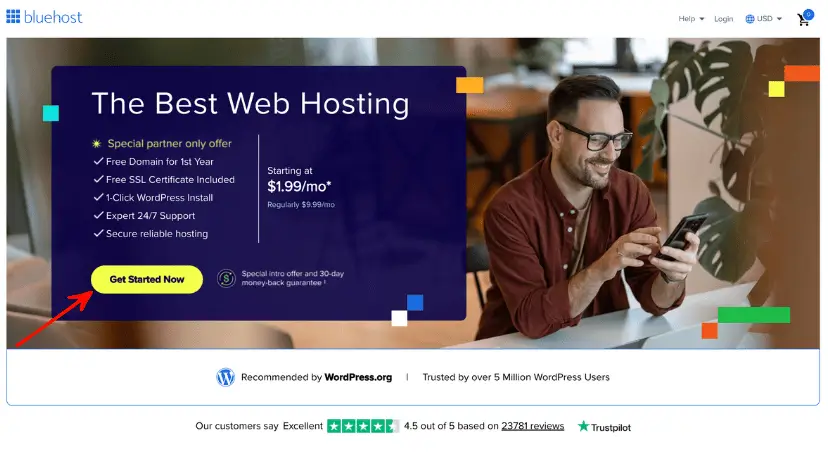
To start your WordPress blog, head over to Bluehost.com and click the Get Started Now button.
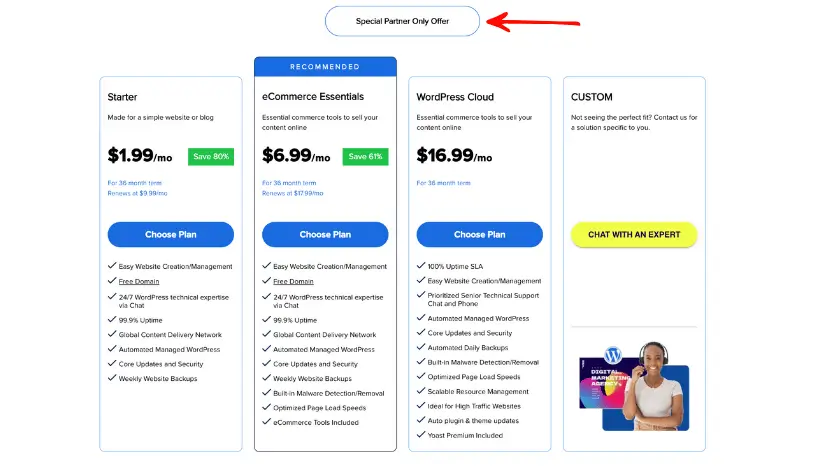
On the next page, you need to choose a plan. Since you are just starting your blogging journey, you can choose the basic plan, which also includes a free domain name for the first year and a free SSL certificate. You can upgrade your hosting plan at any time. You can choose any plan that suits your needs.
Once you choose your plan, click on Choose Plan.
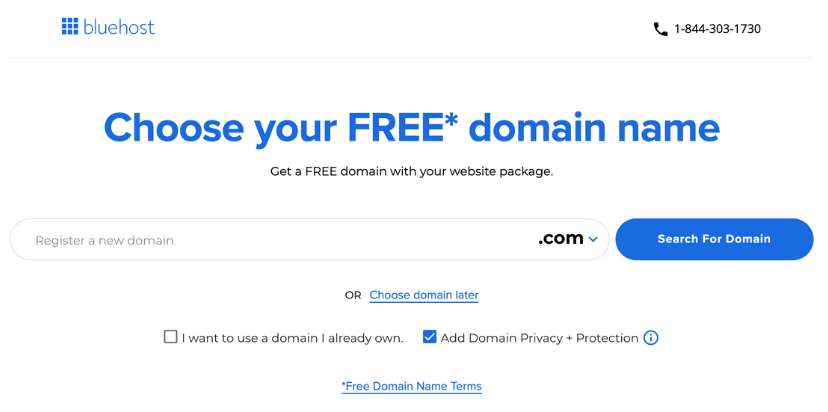
You can choose your existing domain, or you can purchase a new domain, and it’s free. If your domain is not yet finalised, then you can choose a domain later.
Once you’re all done, proceed to the cart section. Review your cart and selected product and addons. I’m not suggesting you add any addons.
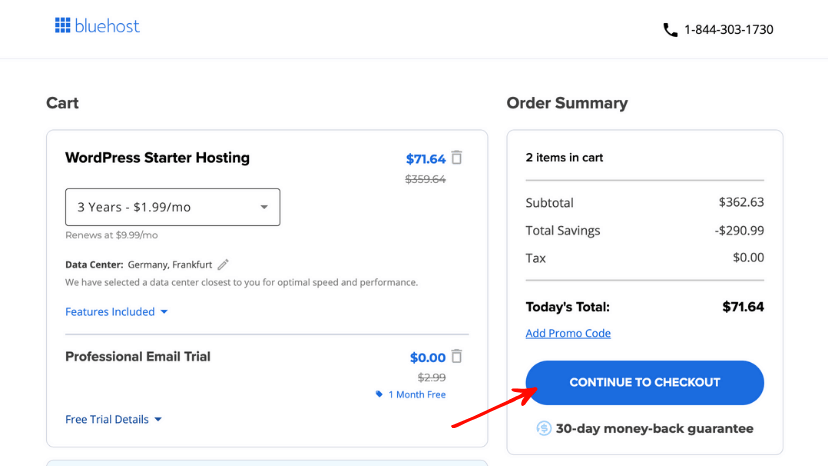
Finally, you must fill in your personal details and pay through your PayPal or credit/debit card. Once payment is made, you will receive a confirmation email from Bluehost with plan details. Ensure you fill in all details correctly, especially your mobile number, email, and free domain name. You can instantly connect with the Bluehost chat support team if you filled in any details incorrectly.
How to Install a WordPress Theme
You logged into your WordPress after entering the details. Your WordPress website layout is wholly based on your Theme; you can customise it according to your needs or install any pre-made theme available on the internet, some are paid and some are free. The Default WordPress theme is good, but a beginner might find customising it slightly hard.
In this section, you will learn how to install a WordPress theme. There are 2 ways to install a WordPress theme.
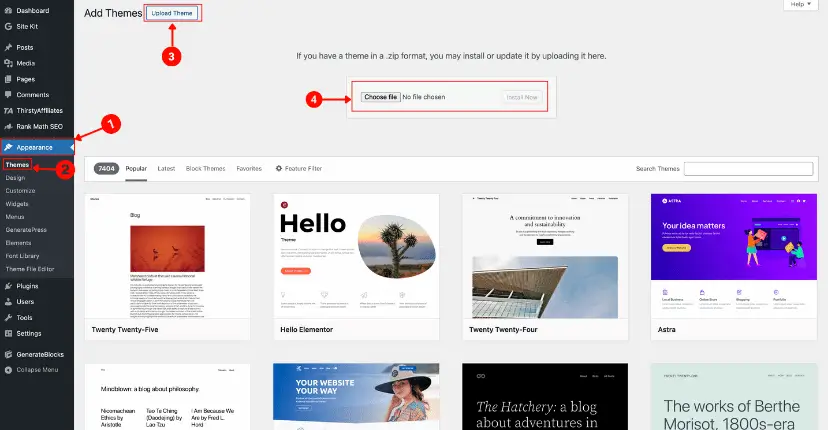
Part 01: If you have paid for the Theme, it must be downloaded from the theme vendor’s site and uploaded to your WordPress. To install a premium theme, navigate to Appearance -> Themes -> Add Theme in your WordPress dashboard, then click on upload, select theme files from your computer in .zip format, and click Install & Activate. Your Theme was activated successfully.
Part 02: If you choose to use a free theme from the WordPress theme repository, you can effortlessly search for and install it directly from your WordPress dashboard—no need to download it to your laptop or computer. To install a Free theme, navigate to Appearance -> Themes -> Add Theme box in your Dashboard. Select your desired theme and click on install & activate. Your Free Theme was activated successfully.
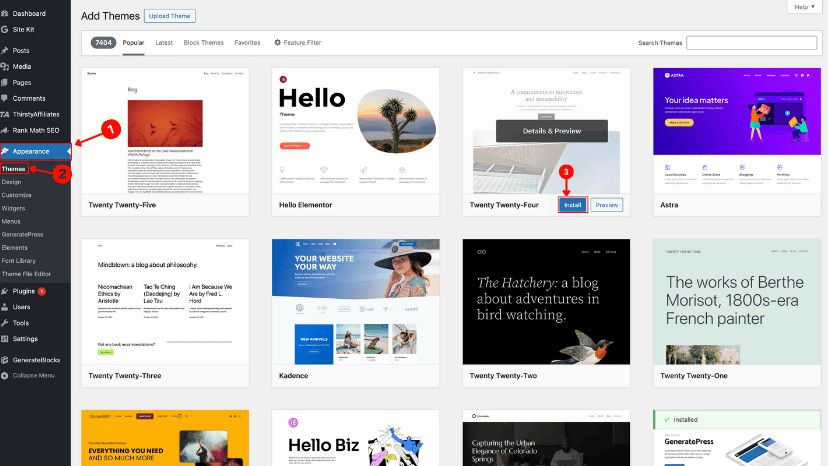
Make Sure to activate your theme. Before picking a random free theme for your blog, be sure to check out our curated list of the Best WordPress themes to help you choose the one that best fits your style and goals.
How to Install a WordPress Plugin
We just learned about how to install a WordPress Theme. Now, let’s learn how to install a WordPress plugin. The theme provides visitors with the website’s look, including colours, fonts, page structure, and overall style—without changing the content. But in plugins, we can add features like improving SEO, adding contact forms, boosting website security, or integrating social media. Plugins allow us to customise the site without any coding. You can enhance your website with thousands of free and premium plugins to suit any need.
Just like a WordPress theme, you can easily find free plugins from the WordPress plugin repository in your WordPress plugin section. We follow the same steps while installing the WordPress theme; we use the Plugin section this time. Here is the Best WordPress Plugin.


Leave a Comment